
Slim, Secure, and Stylish
UltraFlat™ Redefine RFID ID Cards.
What is an RFID UltraFlat™ ID Card ?
RFID UltraFlat™ ID card is a high-tech ID card equipped with an RFID chip, offering secure, reliable performance in a compact and durable design, perfect for a variety of applications.

Flat Design for Better Printing

Security and Convenience of RFID Technology

Highly Customizable

Versatile Applications
A Variety of Chip Options
| Chip Model | MIFARE® DESFire® series (Taking MIFARE® DESFire® Light, MIFARE® DESFire® EV3 2K, and MIFARE® DESFire® EV3 4K as examples) | MIFARE Ultralight® C | MIFARE Classic® EV1 1K | ||
| MIFARE® DESFire® Light | MIFARE® DESFire® EV3 2K | MIFARE® DESFire® EV3 4K | |||
| Communication Standard | ISO/IEC 14443A-2/ -3/ -4 ISO/IEC 7816-4 (NFC supported) | ISO/IEC 14443-2/3 A ISO/IEC 14443-4 ISO/IEC 7816-4 (NFC supported) | ISO/IEC 14443-2/3 A ISO/IEC 14443-4 ISO/IEC 7816-4 (NFC supported) | ISO/IEC 14443A | ISO/IEC 14443A |
| Memory Capacity | 640 bytes | 2K bytes | 4K bytes | 192 bytes | 1K bytes |
| Security | AES 128-bit keys 3-pass mutual authentication | DES/2K3DES/3K3DES/AES128 | DES/2K3DES/3K3DES/AES128 | 3DES Authentication | Mutual three-pass authentication |
| Application | Government Agencies & Enterprise, Mid-Sized Businesses for Attendance & Visitor Management, University or School | High-End Hotel, Financial Institutions & Government Buildings, Smart City Solutions | Access Control, Public Transit, Payment Systems, ID Verification, and Membership Management | Event Access Control, Public Transport Ticketing, One-Time Use Tickets or Vouchers | Small to Medium Enterprise Access Control, School or Corporate Attendance Systems, Small Business Membership |
Note: Other RFID chips are also available upon request!
Application of RFID UltraFlat™ ID Card


Our Custom Services
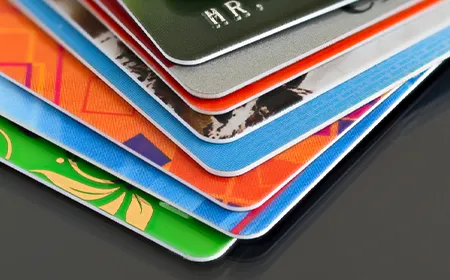
Printing Service: Customers can customize the surface of RFID UltraFlat™ ID card with printing that includes company logos, brand identifiers, barcodes, QR codes, and more. The printing can be done in single color or full color, allowing for personalized visual effects tailored to different needs.

Serial Number Customization: Each RFID UltraFlat™ ID card can be customized with a unique serial number per the customer’s requirements, ensuring that every tag has its own distinct identifier. This serial number can be set through laser engraving, printing, or encoding it within the chip, guaranteeing the uniqueness and accuracy of the information.
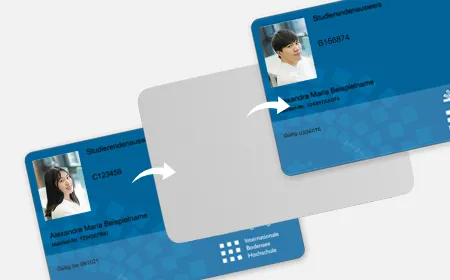

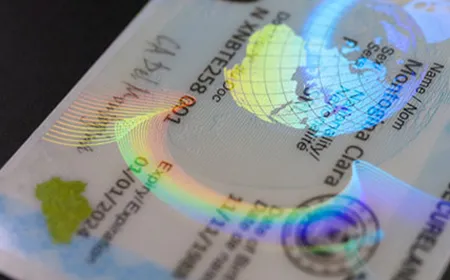



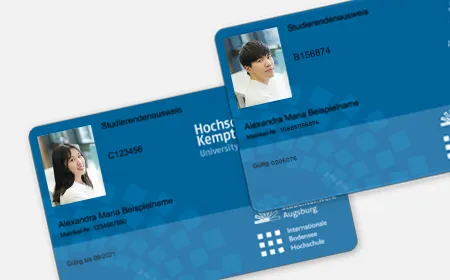

How to Print RFID UltraFlat™ ID Card?
Printable with most card printers, like Entrust, Zebra, Evolis
Product
Print Technology
Print Capabilities
Sigma DS3 Printer
Dye-sublimation / resin thermal transfer
Rewritable technology
Single or dual-sided
Sigma DS3 with Tactile Impression Module
Dye-sublimation / resin thermal transfer
Rewritable technology
Single or dual-sided
Sigma DS3 with Card Lamination Module
Dye-sublimation / resin thermal transfer
Rewritable technology
Single or dual-sided
Sigma DS2 Printer
Dye-sublimation / resin thermal transfer
Single or dual-sided
Sigma DS2C Printer
Dye-sublimation / resin thermal transfer
Dual-sided
Sigma DS2 with Card Lamination Module
Dye-sublimation / resin thermal transfer
Rewritable technology
Single or dual-sided, rewritable technology
Sigma DS1 Printer
Dye-sublimation / resin thermal transfer
Rewritable technology
Single-sided
Precautions for Personalized Printing on
RFID UltraFlat™ ID Cards(Thermal Transfer Printers)
Overlay
Adding an overlay to the surface of cards not only boosts their durability but also enhances the clarity and vibrancy of the print. Also, keep in mind that if the printer has a lamination feature, there’s no need to add an overlay.
Select the Right Ribbon
Using high-quality thermal transfer ribbons (like resin ribbons) is crucial for ensuring print quality while avoiding uneven color variations or blurry prints on the card’s surface.
Control Temperature and Pressure
Temperature and pressure are critical factors during the thermal transfer process that influence print quality. If the temperature is too high or too low, or if the pressure is uneven, it can lead to unclear printing or damage to the card surface.
Clean the Card Surface
Before you start printing, check that the card is free of dust, grease, or any other contaminants. This will help the ink stick evenly during the thermal transfer process, avoiding blurred prints or damage to the card.
Avoid Overprinting
When you’re doing thermal transfer printing, putting on too many layers can make the surface of the card feel rough, which can affect how it feels in your hand. Make sure to keep a good balance on the number of layers and the color density to keep the card surface smooth, and ensure the print looks clear and visually appealing.
Card Drying Time
After the thermal transfer process, cards need some time to cool and dry. Make sure the cards are not subjected to any pressure during the drying phase to prevent the printed designs from smudging or warping.
FAQs
If your order is in stock, we’ll ship it right after you place it. For North America, Europe, and the Asia Pacific, you can expect delivery within 1-3 business days. For other regions, it should arrive in about 3 to 7 business days. For custom cards or products that are temporarily out of stock, it will take about 10 business days to produce them, in addition to shipping time.