In today’s fast-paced business environment, office security and efficiency are critical factors for corporate success. With technological advancements, traditional access control systems and authentication methods are gradually being replaced by more advanced and convenient solutions. Near Field Communication (NFC) authentication technology, as a contactless verification method, is increasingly favored by enterprises for its exceptional security, convenience, and efficiency. This article aims to provide businesses with a clear guide, detailing five simple steps to implement secure tap NFC for authentication in office environments. This approach helps enhance operational efficiency while ensuring the security of sensitive data and physical assets.
What is NFC certification?
NFC is a short-range wireless technology enabling two devices to communicate at close proximity (typically within a few centimeters). NFC authentication leverages this technology to verify user identity or device status through contactless means. In office environments, this allows employees to authenticate themselves by simply tapping an NFC card, NFC tag, NFC wristband, or even an NFC-enabled smartphone against a reader. This grants access to restricted areas, logs them into computers, or enables access to other protected resources.
Benefits of NFC Certification

NFC authentication delivers multiple advantages to offices, making it an ideal security solution for modern enterprises.
- Enhanced Security: NFC technology employs encryption and security protocols, reducing the risk of theft or duplication associated with traditional authentication methods like passwords or physical keys. Its short-range communication also minimizes signal interception.
- Improved Efficiency: Employees complete authentication with a simple tap, eliminating the hassle of entering passwords or searching for keys, significantly boosting access and operational efficiency.
- Convenience: NFC devices come in various forms—cards, key fobs, wristbands, and smartphones—allowing employees to choose the most convenient authentication method based on personal preference.
- Cost-Effectiveness: Over time, NFC systems reduce management costs associated with lost keys or password resets while boosting overall operational efficiency.
- Versatility: NFC extends beyond access control, integrating into diverse office applications like print management, visitor management, and asset tracking—enabling a single card for multiple functions.
Now, let’s explore five simple steps to implement secure, touchless NFC authentication in your office.
Step 1: Assess Your Needs and Develop a Plan

Thorough requirements assessment and meticulous planning form the cornerstone of success before implementing any new technology. This step aims to clarify your office’s specific needs for NFC authentication and lay the groundwork for subsequent system deployment.
- Identify Areas and Resources Requiring NFC Authentication: First, determine which areas (e.g., office entrances, server rooms, specific departments) or resources (e.g., printers, computers, filing cabinets) require NFC-based access control. This helps you understand the number of NFC readers needed and their deployment locations.
- Define User Groups and Authentication Credential Types: Consider which employees or visitors will use NFC authentication and what types of NFC credentials they will utilize. For instance, employees might use NFC employee cards, while visitors could use temporary NFC tags or wristbands. RFIDLabel offers a variety of customizable NFC cards and tags to meet different user needs.
- Evaluate existing infrastructure: Review your current IT infrastructure and security systems. Does the NFC authentication system need to integrate with existing access control systems, network infrastructure, or identity management systems (like Active Directory)? Understanding these compatibility requirements is crucial.
- Set Security Levels and Compliance Requirements: Determine the required NFC authentication security level based on your office’s sensitivity. For instance, high-security areas may require multi-factor authentication. Simultaneously, ensure your NFC solution complies with all relevant industry standards and data privacy regulations.
- Develop a Budget and Timeline: Estimate costs for NFC readers, NFC credentials, software licenses, installation, and maintenance. Establish a realistic implementation schedule and allocate necessary resources.
Step 2: Select the appropriate NFC hardware and software

Based on the results of the initial requirements assessment, you can now proceed to select the appropriate NFC hardware and software solutions for your office. The right choices will ensure system stability, security, and ease of use.
- NFC Reader: Select an NFC reader that aligns with your security requirements and integration needs. Various reader types are available on the market, including desktop models, wall-mounted units, and modules that integrate into existing equipment. Consider the reader’s read range, encryption support, and compatibility with your existing systems.
- NFC Credentials: RFIDCard offers a range of high-quality NFC credentials, including:
- Hotel Key Cards: Ideal for hotels or scenarios requiring temporary access control.
- RFID Cards / NFC Cards: Standard card format, customizable with logos and designs.
- RFID Tags / NFC Tags: Flexible and versatile tag formats suitable for asset tracking or specific item authentication.
- RFID Wristbands / NFC Wristbands: Ideal for hands-free authentication scenarios like gyms or events.
- Custom RFID Tags / NFC Tags: Tailored shapes, sizes, and functionalities based on your specific requirements.
When selecting credentials, consider durability, security, and ease of use for daily employee operations.
- NFC Management Software: The core NFC management software handles user registration, permission management, data encryption, and system monitoring. It should include:
- User Management: Effortlessly add, remove, and modify user permissions.
- Access Control Policies: Define access rights and time restrictions for different user groups.
- Event Logging: Records all NFC authentication events for auditing and troubleshooting.
- Integration Capabilities: Seamlessly integrates with existing identity management systems (e.g., LDAP, Active Directory) or third-party applications.
- Security: Supports robust encryption protocols and data protection measures.
Step 3: System Deployment and Integration

After selecting the appropriate hardware and software, the next step is to deploy the NFC authentication system within your office environment and integrate it with existing systems. This phase requires meticulous planning and professional execution.
- Install NFC Readers: Install NFC readers at the locations determined in the first step. Ensure readers are securely mounted, positioned for employee convenience, and connected to stable power and network sources. For access control systems, install the reader on the door frame or wall, connected to the electric lock system.
- Configure NFC Management Software: Install and configure the NFC management software. This involves setting up servers, databases, network connections, and integration with existing identity management systems (e.g., Active Directory, LDAP). Ensure all security patches and updates are applied.
- Register NFC credentials: Register NFC credentials for your employees and authorized users. This typically involves associating each NFC card, tag, or wristband with a specific user ID and assigning corresponding access permissions.
- Test system functionality: Thoroughly test the entire NFC authentication system before full activation. Test all readers, NFC credentials, and software functions to ensure they operate as intended. Verify access permissions for different users, along with response times and stability across various scenarios.
- Data Encryption and Security Configuration: Ensure all NFC communications are encrypted, and data storage within management software adheres to the highest security standards. Configure firewalls, intrusion detection systems, and other security measures to protect the NFC authentication system from unauthorized access and cyberattacks.
Step 4: User Training and Promotion
Even the most advanced technology cannot deliver its full potential if users do not understand how to operate it. Therefore, thorough employee training and effective promotion are crucial for the successful implementation of the NFC authentication system.
- Develop a Training Plan: Create a comprehensive training program for all employees who will use the NFC authentication system. Training should cover the fundamentals of NFC authentication, proper usage of NFC credentials (cards, tags, wristbands, or mobile phones), frequently asked questions, and how to seek assistance when encountering issues.
- Provide Clear User Guides: Prepare easy-to-understand written or digital user guides featuring illustrations and step-by-step instructions. Display these guides prominently in office areas or distribute them via internal email systems.
- Conduct Hands-On Demonstrations: Organize on-site demonstrations or online workshops to give employees hands-on experience with the NFC authentication process and address their questions. Practical exercises help staff become familiar with the new system more quickly.
- Establish dedicated support channels: Create a specialized support channel, such as an IT help desk or internal communication platform, where employees can promptly receive assistance with NFC authentication issues. Ensure the support team possesses in-depth knowledge of the NFC system.
- Implement a phased rollout: Consider introducing the NFC authentication system in stages. For example, pilot it within small teams or departments first, gather feedback, make adjustments, and then expand to the entire office. This approach facilitates a smoother transition and minimizes potential disruptions.
Step 5: Ongoing Maintenance and Optimization
The deployment of an NFC authentication system is not a one-time effort. To ensure its long-term stable, efficient, and secure operation, ongoing maintenance and regular optimization are essential.
- Regular System Checks: Periodically inspect the operational status of NFC readers, servers, and network equipment. Verify that all hardware devices are functioning properly with no physical damage or connectivity issues. Review software logs to promptly identify and resolve potential faults or anomalies.
- Software Updates and Patch Management: Promptly install the latest updates and security patches for NFC management software and related operating systems. Software vendors continuously release updates to fix vulnerabilities, enhance performance, and add new features. Keeping systems up-to-date is crucial for defending against cyber threats.
- Permission Review and Adjustment: Periodically review employee NFC access permissions. As employee responsibilities change or personnel turnover occurs, access rights may require adjustment. Promptly revoke permissions for departing employees and assign appropriate access to new hires based on their roles, upholding the principle of least privilege.
- Data Backup and Recovery: Regularly back up critical data within the NFC management system, such as user credentials, access logs, and configuration settings. Develop a detailed data recovery plan to address scenarios involving data loss or system failures.
- Performance Monitoring and Optimization: Monitor the NFC authentication system’s performance metrics, including authentication response times and system load. Optimize the system based on monitoring results—adjust server configurations, optimize database queries, or upgrade hardware—to ensure it meets growing demands.
- Security Audits and Vulnerability Scans: Conduct regular security audits and vulnerability scans to identify potential weaknesses in the NFC authentication system. Engage professional third-party security firms to perform penetration testing and validate system security.
Conclusion
In today’s digital age, office security and operational efficiency are central to a company’s sustained growth. By implementing secure touchless NFC authentication, businesses can significantly enhance the security of their physical and digital assets while delivering unprecedented convenience to employees. From the initial needs assessment to ongoing maintenance, every step is crucial in building a robust and flexible authentication system.
Investing in an NFC authentication system means investing in a safer, more efficient, and smarter future office. Take action now and partner with RFIDCard to embark on a new chapter in your office security management.
Recommended Product
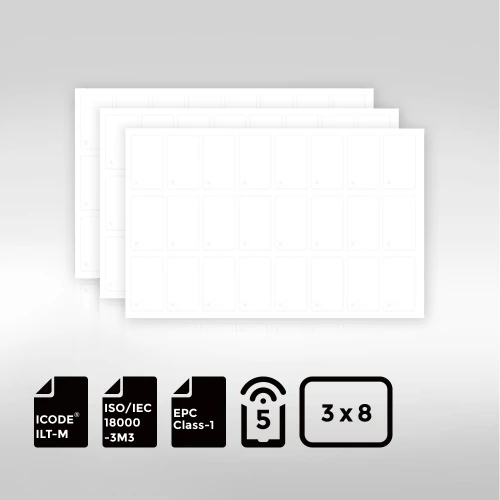
BioPoly™ Vinyl RFID Inlay Sheet NXP® ICODE® ILT-M

The NXP® ICODE® ILT-M BioPoly™ Vinyl RFID Inlay Sheet combines cutting-edge high-frequency RFID performance with a commitment to sustainability. Featuring the advanced ICODE® ILT-M chip and compliant with ISO/IEC 18000-3 Mode 3, it delivers ultra-fast data transfer, high memory capacity, and superior reading distances, making it ideal for applications such as supply chain management, asset tracking, logistics, and industrial automation.
Made from eco-friendly BioPoly™ vinyl, this inlay sheet helps your business reduce its environmental footprint while maintaining exceptional durability and printability. Whether used in custom labels, smart packaging, or intelligent inventory systems, the ILT-M BioPoly™ enables your brand to achieve operational efficiency, environmental responsibility, and a stronger connection with customers—all in one smart solution.