RFID Card Not Working? Troubleshooting Guide to Fix It Fast
Meta description: RFID card not working? Learn quick troubleshooting steps, common causes, and fixes to identify issues fast and know when to replace your card.
Your RFID card suddenly stops working—no access, no explanation, and often at the worst possible time.
Whether you’re managing hotel key cards, employee access badges, or membership cards, RFID cards are highly reliable, but like any technology, occasional issues may arise—and most can be quickly diagnosed in minutes.
In this guide, you’ll learn exactly how to troubleshoot an RFID card step by step, identify the root cause, and decide whether to fix or replace it.
Quick Answer (Get This Fixed Fast)
RFID card not working? Follow this quick process:
- Test another card on the same reader
- Check if your card is detected
- Inspect for physical damage
- Verify encoding and access permissions
In most cases, physically damaged RFID cards cannot be repaired and must be replaced.
RFID Card Troubleshooting Flow (Step-by-Step)
Follow this simple decision flow to quickly identify the issue:
Step 1: Check If the Reader Is Working
Before assuming the card is faulty, test the system.
What to do:
- Try scanning a different RFID card on the same reader
Result:
- ✅ Other cards work → Go to Step 2
- ❌ No cards work → The reader or system may be the issue
Step 2: Is Your RFID Card Detected?
Now test your card.
What to look for:
- Does the reader respond at all?
- Any beep, light, or signal?
Result:
- ❌ No response → Likely card damage or chip failure → Replace the card
- ✅ Card detected → Go to Step 3
Step 3: Is Access Denied?
If the card is detected but doesn’t grant access:
Possible issue:
- Incorrect or expired permissions
What to do:
- Re-encode or reprogram the card
- Check backend system settings
Can it be fixed? ✅ Yes (usually system-related)
Step 4: Does the Card Work Intermittently?
Symptoms:
- Works sometimes, fails other times
- Requires multiple taps
What to do:
- Test across multiple readers
- Check for bending or wear
Diagnosis: Early-stage damage or weak signal
Recommended action: Replace soon to avoid total failure

Step 5: Check for Physical Damage
Carefully inspect the card:
- Bent or warped shape
- Cracks or surface damage
- Signs of heat or water exposure
Even small internal damage can break the antenna.
Can it be fixed? ❌ No
Recommended action: Replace the card
Step 6: Consider Compatibility Issues
If your card works on some devices but not others:
Possible cause:
- Frequency mismatch (LF / HF / UHF)
- Unsupported chip type
What to do:
- Verify chip type (e.g., NTAG, MIFARE)
- Ensure compatibility with your reader system
Can it be fixed? ⚠️ Sometimes (depends on system setup)
Common RFID Card Issues by Scenario
To help you diagnose faster, here are common real-world cases:
Hotel Key Card Not Working
- Often caused by frequent use, demagnetization myths, or poor card quality
- High turnover environments increase failure rates
Best solution: Use durable, high-frequency RFID cards designed for hospitality
Office Access Card Not Working
- Usually related to permission or system sync issues
- Sometimes caused by worn-out cards in high-traffic offices
Quick fix: Re-encode or replace depending on condition
RFID Card Suddenly Stopped Working
- Common causes: heat exposure, pressure damage, or chip failure
Best solution: In most cases, replacement is required
Can RFID Cards Be Repaired?
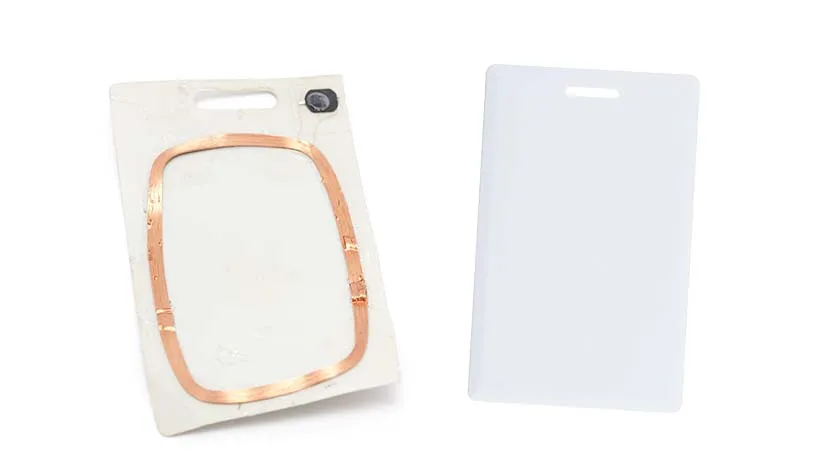
In most cases, RFID cards are designed as sealed, compact devices, which makes physical repair impractical.
- Internal antennas are sealed inside the card: These antennas are critical for communication with readers and are embedded within the card’s layers. Attempting to open or tamper with the card can permanently damage its functionality.
- Chip damage is irreversible: The microchip inside stores unique identifiers and access data. Once the chip is physically damaged, its data integrity cannot be restored.
What you can do instead:
- Reprogramming: If the card is not reading due to a system or software issue, it can often be reprogrammed or reset without replacing the hardware.
- Replacement: If the card has suffered physical damage—cracks, deep scratches, or bent components—the most reliable solution is to replace it with a new one.
Pro tip: Regular care and proper storage can prevent most physical or software-related issues, minimizing the need for replacements and ensuring smooth access every time.
How to Prevent RFID Card Failures
If you’re dealing with frequent card issues, prevention matters.
Here’s how to extend RFID card lifespan:
- Avoid bending or storing in tight wallets
- Keep cards away from heat and moisture
- Don’t store with metal objects or electronics
- Use protective sleeves if needed
Want a complete guide?
Check out our RFID Card Care Tips: How to Protect and Extend Card Lifespan.
How to Reduce RFID Card Failures at Scale
If your business frequently deals with:
- High replacement rates
- Customer complaints
- Inconsistent card performance
The issue may not be usage—it could be card quality.
Low-quality RFID cards often have:
- Weak antennas
- Poor lamination
- Unstable chip performance
RFID card issues can be frustrating, but most problems can be diagnosed and resolved quickly with a step-by-step approach.
If problems persist, consider upgrading to high-quality, durable RFID solutions designed for frequent use and harsh environments to ensure reliable access.

Upgrade to Reliable RFID Card Solutions
Choosing the right RFID cards can significantly reduce failure rates and improve user experience.
Look for:
- High-quality chip options (NTAG®, MIFARE®, etc.)
- Durable materials (PVC, PET, composite)
- Strong antenna design for consistent performance
- Pre-encoding and customization support
Talk to Our RFID Experts
Looking to improve reliability and reduce replacement costs?
- Custom RFID card solutions
- Bulk pricing (factory direct)
- Chip selection guidance
- Encoding and printing services
FAQs
1. Why does my RFID card stop working suddenly?
Most often, RFID card issues are caused by physical damage, chip failure, or environmental exposure. Damage can include bending, scratches, or cracks that affect the internal antenna. Extreme heat, pressure, or moisture can also temporarily disrupt the card’s performance. Handling cards carefully can prevent many problems.
2. Can RFID cards be repaired?
Usually, RFID cards cannot be physically repaired because the antenna and chip are sealed inside. If the issue is system-related, the card may be reprogrammed. For physical damage like cracks or broken chips, replacement is the most reliable solution.
3. How long do RFID cards last?
RFID cards typically last 1–3 years, depending on usage and quality. High-quality cards with durable chips can last longer, while frequent bending or exposure to harsh conditions may shorten lifespan.
4. Why does my card work sometimes but not always?
Intermittent performance often points to early-stage damage or weak signal strength. Small cracks or dirt on the card surface can prevent consistent reading. Testing in different readers or cleaning gently can help.
5. Are RFID cards affected by magnets?
RFID cards are not affected by magnets like magnetic stripe cards, but strong electromagnetic interference (EMI) can temporarily disrupt performance. Storing cards away from strong EMI sources helps maintain reliability.